Choosing the right UI architecture changes how your app scales, how easy it is to test, and how fast your team ships features. This guide compares MVC and MVVM—focusing on data binding, testability, coupling, and practical use cases—so you can choose the right pattern for web, mobile, or desktop projects.
December 23, 2025 (9mo ago) — last updated March 11, 2026 (6mo ago)
MVVM vs MVC: Practical Guide for Developers
Compare MVVM and MVC: data binding, testability, coupling, and when to choose each pattern for web, mobile, and desktop apps.
← Back to blog
MVVM vs MVC: Practical Differences & Use Cases
Model View ViewModel vs MVC: A concise comparison of data binding, testability, and use cases to help you choose the right pattern.
Introduction
Choosing the right UI architecture changes how your app scales, how easy it is to test, and how fast your team ships features. This guide compares Model–View–Controller (MVC) and Model–View–ViewModel (MVVM), focusing on data binding, testability, coupling, and practical use cases so you can pick the best fit for web, mobile, or desktop projects. MVC remains common in many web projects1, while MVVM is widely adopted for rich client apps and reactive interfaces2.
Core idea
At their core, the main difference between MVVM and MVC is how they manage the relationship between the View and the Model. MVC uses a Controller to process user input and orchestrate updates to the Model and the View. MVVM introduces a ViewModel that exposes state and commands the View can bind to, enabling automatic synchronization via data binding. This reduces UI boilerplate and improves testability for complex interfaces.
Why the pattern choice matters
Picking an architectural pattern early affects maintenance, testing, and scalability. Both MVC and MVVM separate concerns, but they do so differently. Understanding each pattern’s components and interactions helps you choose what fits your app’s complexity and team workflow.
MVC has been widely used for decades and is still a practical choice for server-rendered apps1. MVVM emerged to address the rising complexity of client-side UIs by moving presentation logic into a testable ViewModel, a shift reflected in modern frameworks and tooling3.
Core component differences
- Model: Holds data and business rules. Similar in both patterns.
- View: The UI layer. Presents data and forwards user actions.
- Controller (MVC): Handles user input, updates the Model, and selects Views.
- ViewModel (MVVM): Prepares and exposes data for the View, often via data binding.
The simplest way to think about it: MVC’s Controller tells the View what to do. MVVM’s ViewModel gives the View the state and commands it needs, and the View decides how to render that data.
Quick comparison at a glance
| Criterion | MVC (Model–View–Controller) | MVVM (Model–View–ViewModel) |
|---|---|---|
| Primary mediator | Controller handles user input and orchestrates updates. | ViewModel prepares and provides data for the View. |
| Coupling | View and Controller are more tightly coupled. | View and ViewModel are loosely coupled via data binding. |
| Data flow | Typically unidirectional: user → Controller → Model → View. | Often bidirectional: View ↔ ViewModel via binding. |
| Testability | UI logic in Controller can be harder to unit test. | ViewModel logic is easily unit tested without UI. |
| Ideal use cases | Server-side web apps, REST APIs, simpler UIs. | Complex client apps (SPAs, desktop, mobile) with rich interaction. |
How MVC works
MVC separates an application into three parts so data, presentation, and business logic don’t become tangled. This makes code more modular, easier to maintain, and scalable for many server-side scenarios.
MVC components
- Model: Manages data, validation, persistence, and business rules.
- View: Renders data for users with minimal logic.
- Controller: Receives user input, interacts with the Model, and chooses Views.
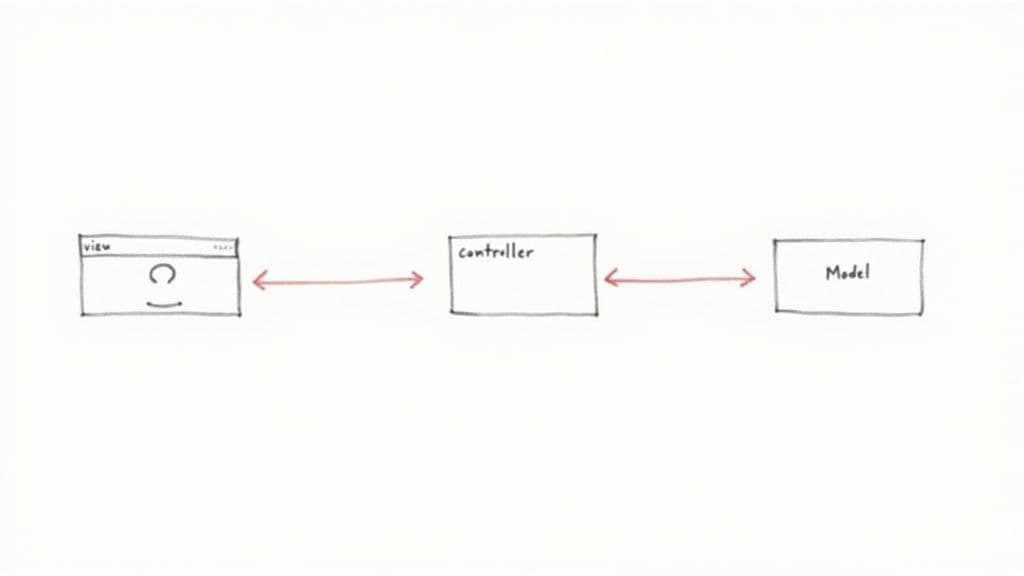
The typical flow—user → View → Controller → Model → View—is well suited to server-rendered applications and APIs.
MVC data flow example
- User clicks “Save.”
- View notifies Controller.
- Controller updates Model.
- Model persists changes and notifies listeners.
- Controller chooses the next View to render.
This explicit control flow is intuitive for many server-side apps and APIs.
MVC example (TypeScript/Express-like)
// --- Model ---
class User {
  constructor(public name: string, public email: string) {}
  save() {
    console.log(`Saving user ${this.name} to the database.`);
  }
}

// --- Controller ---
class UserController {
  updateUser(req) {
    const { name, email } = req.body;
    const user = new User(name, email);
    user.save();
    return { view: 'userProfile', data: { name: user.name } };
  }
}

// --- View ---
function renderView(viewName, data) {
  if (viewName === 'userProfile') {
    return `<h1>Profile for ${data.name}</h1><p>Successfully updated!</p>`;
  }
  return `<h1>Error</h1>`;
}
How MVVM works
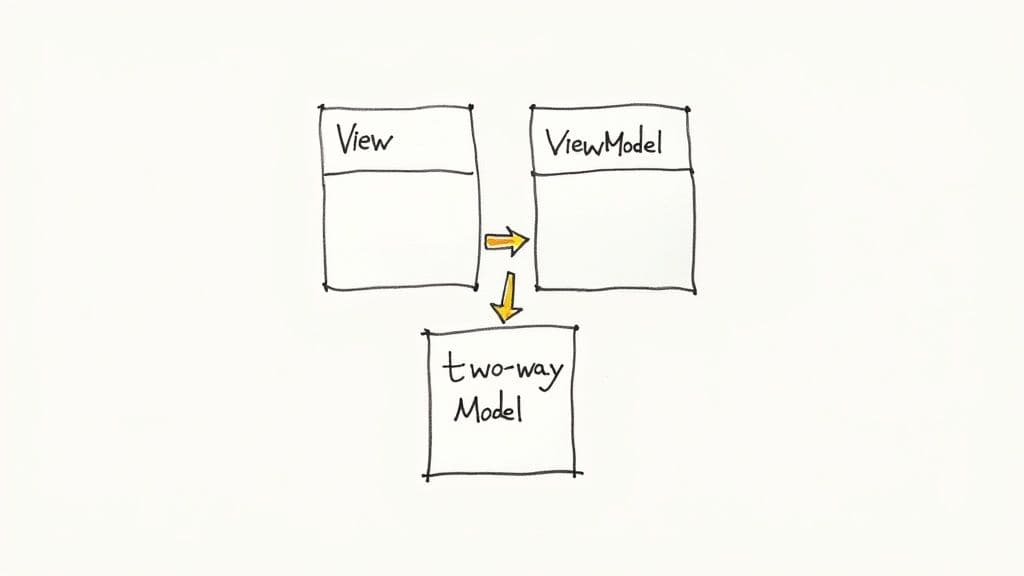
MVVM adds a ViewModel between the View and the Model. The ViewModel holds UI state, prepares data for display, and exposes commands. The View binds to the ViewModel’s properties, enabling automatic synchronization and keeping the View simple.
The power of data binding
Data binding is the defining advantage of MVVM. Instead of manually updating the UI from the Controller, changes in the ViewModel automatically update the View, and user actions in the View update the ViewModel. This reactive model reduces boilerplate and leads to cleaner, more declarative code. Many teams report productivity gains when using MVVM ideas in modern frameworks2.
Testability benefits
Because a ViewModel is a plain object with no direct UI dependencies, you can:
- Isolate presentation logic for unit tests.
- Mock the Model and verify ViewModel behavior.
- Run headless tests without a browser.
This makes tests faster and more reliable compared with UI-driven Controller logic.
MVVM example (React-style)
import React, { useState, useEffect } from 'react';

const fetchUserData = async (userId) => {
  return { name: 'Jane Doe', status: 'Active' };
};

const UserProfile = ({ userId }) => {
  const [userName, setUserName] = useState('Loading...');
  const [userStatus, setUserStatus] = useState('');

  useEffect(() => {
    const loadUser = async () => {
      const userData = await fetchUserData(userId);
      setUserName(userData.name);
      setUserStatus(`Status: ${userData.status}`);
    };
    loadUser();
  }, [userId]);

  return (
    <div>
      <h1>{userName}</h1>
      <p>{userStatus}</p>
    </div>
  );
};
In this example, component state and hooks act as the ViewModel while JSX is the View bound to that state.
Head-to-head comparison
The core of the MVVM vs MVC choice is how you manage complexity. Both separate concerns, but they do so in ways that favor different project types.
Data binding and UI updates
MVC uses explicit updates: Controller pushes changes to Views. MVVM exposes state and relies on binding to keep UI and data in sync. That difference reduces boilerplate and simplifies large UIs when using MVVM.
Component coupling
MVC tends to couple View and Controller, which can hamper reuse and testing. MVVM keeps ViewModel unaware of the View, making both easier to reuse and test.
State management and logic
MVC can lead to bulky Controllers that mix routing, state, and presentation logic. MVVM centralizes UI state in the ViewModel, which acts as a dedicated state container for the View.
| Aspect | MVC | MVVM |
|---|---|---|
| Primary Mediator | Controller orchestrates interactions. | ViewModel prepares data for View. |
| Component Coupling | More tightly coupled. | Loosely coupled. |
| Data Binding | Manual updates. | Automatic binding. |
| State Management | Often in Controller. | Encapsulated in ViewModel. |
| Testability | Harder to unit test UI logic. | Easier to unit test ViewModel. |
| Performance | Direct control; no binding overhead. | Slight binding overhead; modern frameworks optimize this. |
| Learning Curve | Lower for simple apps. | Steeper; requires understanding reactive patterns. |
When to choose MVC
MVC is pragmatic for server-side apps, REST APIs, and simple web projects where UI logic is straightforward. Use MVC when:
- You’re building REST APIs where the View is a JSON response.
- Your UI interactions are linear and predictable.
- You need rapid prototyping with minimal upfront architecture.
Checklist for MVC:
- Is UI state simple? If yes, MVC is likely sufficient.
- Are interactions mostly request–response? MVC fits well.
- Does your team already know MVC? That reduces onboarding time.
- Is raw rendering performance a key concern? MVC avoids data-binding overhead.
When to choose MVVM
MVVM excels for dynamic, interactive UIs where state is complex and test coverage for presentation logic matters. Choose MVVM when:
- You have many UI elements that must stay in sync.
- Unit testing of presentation logic is a priority.
- You’re building reactive or real-time applications.
Checklist for MVVM:
- Is your UI highly interactive and stateful? If yes, MVVM fits.
- Is comprehensive UI-unit testing required? MVVM helps.
- Are you using a modern frontend framework (React, Vue, Angular)? They align with MVVM ideas3.
- Will multiple developers work on UI and logic in parallel? MVVM reduces friction.
Industry research and platform docs show MVVM and MVVM-like approaches are common when building scalable reactive UIs4.
Migration: MVC → MVVM
Migrating is practical and often incremental:
- Identify presentation logic stuck in Controllers.
- Extract that logic into ViewModel classes or objects.
- Rewire Views to bind to the ViewModel instead of relying on Controller-driven rendering.
Refactor step-by-step to reduce risk and let the team realize benefits gradually.
Here at Clean Code Guy, we guide teams through architectural decisions and refactors. If your codebase feels tangled and you need to restore velocity, our Codebase Cleanups and AI-Ready Refactors can help you ship faster with confidence.
Frequently asked questions
Q: Which pattern is better for a simple content site?
A: MVC. For blogs, simple CMSs, and server-rendered sites, MVC’s direct flow is lightweight and easy to maintain.
Q: Which pattern makes UI code easier to unit test?
A: MVVM. Presentation logic lives in the ViewModel, which can be tested without a UI framework.
Q: Can I migrate gradually from MVC to MVVM?
A: Yes. Extract presentation logic into ViewModels feature by feature, then update Views to bind to those ViewModels.
Additional Q&A
Q: How does data binding affect performance?
A: Data binding adds some runtime overhead, but modern frameworks optimize bindings and change detection. For most apps, the developer productivity and maintainability gains outweigh the cost.
Q: Can I mix patterns in one project?
A: Yes. It’s common to use MVC for server-side routes and MVVM (or MVVM-like patterns) for client-side features. Gradual migration is safe and effective.
Q: What’s the best first step to improve a tangled UI codebase?
A: Start by writing unit tests around core presentation logic, then extract that logic into ViewModels or services so the UI becomes thinner and easier to maintain.
1.
Stack Overflow, “Developer Survey 2023,” Stack Overflow Insights, 2023. https://insights.stackoverflow.com/survey/2023
2.
Information and Communications Technology Council (ICTC), research and reports on developer productivity, 2021. https://www.ictc-ctic.ca/
3.
Microsoft Docs, “MVVM pattern in .NET MAUI,” Microsoft Learn. https://learn.microsoft.com/en-us/dotnet/architecture/maui/mvvm
4.
Deloitte Canada, Technology trends and analysis on scalable UI architectures, 2024. https://www2.deloitte.com/ca/en/pages/technology/topics/technology-trends.html
5.
Clean Code Guy, Patterns of enterprise application architecture and software design discussions. https://cleancodeguy.com/blog/patterns-of-enterprise-application-architecture
🙋🏻♂️
AI writes code.You make it last.
In the age of AI acceleration, clean code isn’t just good practice — it’s the difference between systems that scale and codebases that collapse under their own weight.