The Adapter pattern connects incompatible interfaces so your app can evolve without risky rewrites. This practical TypeScript guide shows how to translate legacy XML, standardize third-party gateways, and protect business logic with small, testable adapters.
January 7, 2026 (9mo ago) — last updated July 9, 2026 (3mo ago)
Adapter Pattern in TypeScript — Practical Guide
Learn the Adapter pattern in TypeScript with practical examples to bridge incompatible APIs, modernize legacy systems, and keep code scalable.
← Back to blog
Adapter Pattern in TypeScript — Practical Guide
Summary: Learn the Adapter pattern with practical TypeScript examples to bridge incompatible APIs, modernize legacy systems, and keep your codebase scalable.
Introduction
The Adapter pattern helps you connect two incompatible interfaces so your application can evolve without risky rewrites. This guide uses real TypeScript examples to show how adapters translate legacy XML, standardize third-party gateways, and protect your core business logic. You’ll get clear patterns, migration steps, testing advice, and references to authoritative sources to help you apply adapters in production.
Why the Adapter Pattern Matters

Think of the Adapter pattern as a travel adapter for code: the charger and socket work fine, but their interfaces don’t match. Modern systems combine third-party libraries, external APIs, and legacy services, so these mismatches are common. In the 2023 Stack Overflow Developer Survey, JavaScript and related ecosystems remain the most-used technologies, driving heavy reuse of libraries and APIs across projects and making integration patterns such as Adapter particularly relevant1.
Common problems adapters help avoid:
- Code duplication where translation logic is repeated across the app.
- High coupling when business logic depends on specific external APIs.
- Growing technical debt when fragile integration code spreads through the codebase.
Using a dedicated adapter class centralizes translation logic and keeps application code clean and stable. This supports modular architecture and enables gradual modernization2.
“The Adapter pattern protects the simplicity and integrity of your core logic by shielding it from the messy details of external systems.”
How the Adapter Pattern Works
At its core, the pattern separates concerns so components can evolve independently. The four roles are:
- Client: code that expects a stable interface.
- Target: the interface the Client uses.
- Adaptee: the existing component with an incompatible interface.
- Adapter: implements Target and translates calls to the Adaptee.
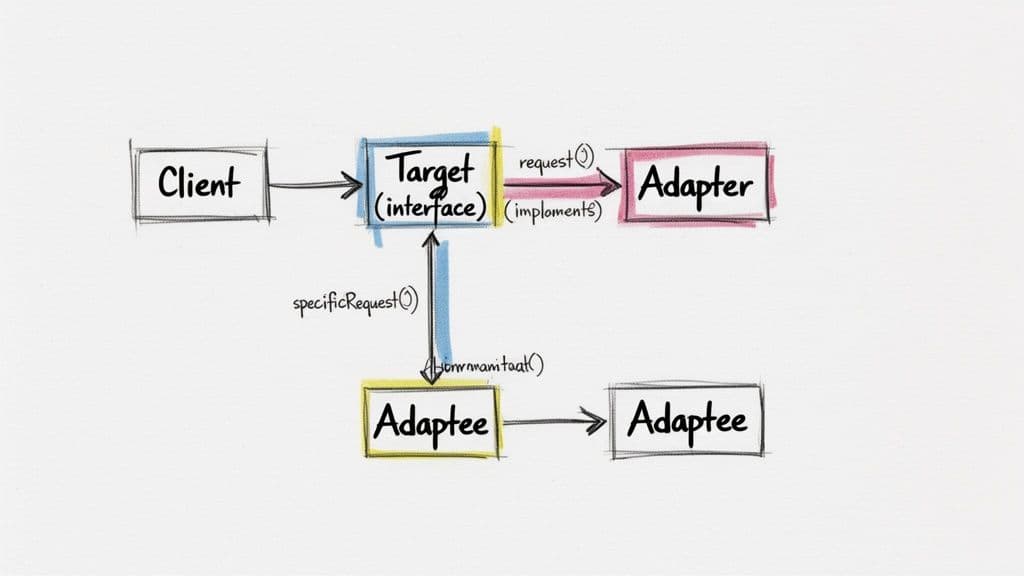
The Client only calls the Target; the Adapter handles translation. This keeps client code stable while new services or legacy systems are integrated via new adapters. The pattern fits the Open/Closed Principle: extend with adapters instead of changing existing clients3.
Building Adapters in TypeScript — Real Examples
Below are two practical TypeScript examples: adapting a legacy XML API and standardizing a third-party payment gateway. Keep adapters focused on transformation and small enough to test easily.
Example 1: Adapting a Legacy XML API to JSON
Scenario: your React frontend expects JSON, but the data source returns XML. The client uses an IUserService interface; LegacyUserService returns XML. An adapter bridges them.
The Incompatible Adaptee
// Adaptee: The old service with an incompatible interface
class LegacyUserService {
  fetchUsersXML(): string {
    return `
      <users>
        <user id="1">
          <name>Alice</name>
          <email>alice@example.com</email>
        </user>
        <user id="2">
          <name>Bob</name>
          <email>bob@example.com</email>
        </user>
      </users>
    `;
  }
}
The Target Interface and Adapter
interface IUser {
  id: number;
  name: string;
  email: string;
}

interface IUserService {
  getUsers(): Promise<IUser[]>;
}

class UserServiceAdapter implements IUserService {
  private adaptee: LegacyUserService;

  constructor(legacyService: LegacyUserService) {
    this.adaptee = legacyService;
  }

  async getUsers(): Promise<IUser[]> {
    const xmlData = this.adaptee.fetchUsersXML();
    // Use a robust XML parser in production (e.g., xml2js).
    console.log("Translating XML to JSON...");
    return [
      { id: 1, name: "Alice", email: "alice@example.com" },
      { id: 2, name: "Bob", email: "bob@example.com" },
    ];
  }
}
Client code consumes IUserService and remains agnostic to XML.
Example 2: Standardizing a Third-Party Payment Gateway
Scenario: your app uses a standard IPaymentProcessor interface, but PayWizard exposes startTransaction and verifyPaymentStatus. The adapter maps your calls to PayWizard’s API.
The Inconsistent Adaptee
class PayWizard {
  startTransaction(amount: number, cardDetails: string): string {
    console.log(`PayWizard: Initiating transaction for $${amount}.`);
    const transactionId = "pw_" + Math.random().toString(36).substr(2, 9);
    return transactionId;
  }

  verifyPaymentStatus(transactionId: string): boolean {
    console.log(`PayWizard: Verifying status for ${transactionId}.`);
    return true;
  }
}
The Target Interface and Adapter
interface IPaymentProcessor {
  processPayment(amount: number, cardInfo: string): Promise<string>;
  checkStatus(id: string): Promise<boolean>;
}

class PayWizardAdapter implements IPaymentProcessor {
  private payWizard: PayWizard;

  constructor() {
    this.payWizard = new PayWizard();
  }

  async processPayment(amount: number, cardInfo: string): Promise<string> {
    console.log("Adapter: Translating 'processPayment' to 'startTransaction'.");
    return this.payWizard.startTransaction(amount, cardInfo);
  }

  async checkStatus(id: string): Promise<boolean> {
    console.log("Adapter: Translating 'checkStatus' to 'verifyPaymentStatus'.");
    return this.payWizard.verifyPaymentStatus(id);
  }
}
Adapters keep application code consistent across providers and make swapping providers simpler.
Refactoring Legacy Code With Adapters
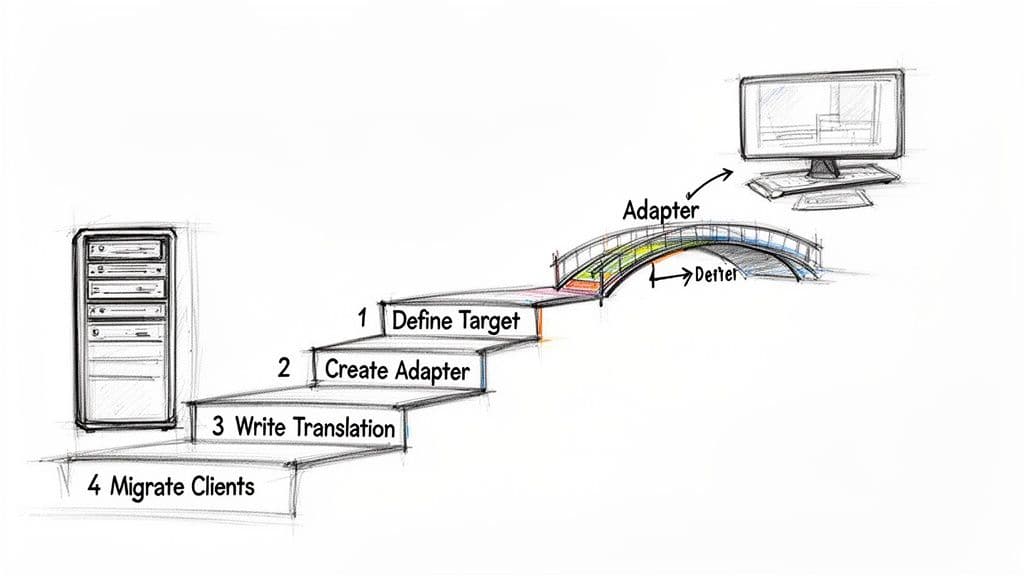
When legacy systems are stable but their interfaces conflict with modern expectations, adapters let you avoid a risky big rewrite. Wrap old systems with a Target interface and migrate clients incrementally. This reduces risk and supports a controlled modernization plan2.
A practical migration plan:
- Define your ideal Target interface.
- Create an Adapter class that implements that interface and accepts the legacy Adaptee.
- Implement translation logic inside the adapter.
- Migrate client code incrementally to use the Adapter.
Modern tooling and AI can help scaffold adapters, but the team should own the architectural decisions and mapping logic. Always add tests that validate the translation.
“Using an adapter isn’t just a temporary fix; it’s a strategic investment in architectural health that enables incremental modernization.”
Choosing Between Adapter and Related Patterns
Adapter, Decorator, Proxy, and Façade sometimes look similar. Pick the one that matches intent:
- Adapter: convert one interface to another so components can interoperate.
- Decorator: add behavior while preserving the interface.
- Proxy: control access, add caching, or lazy initialization while keeping the same interface.
- Façade: provide a simplified interface over a complex subsystem.
| Pattern | Primary Intent | When to Use |
|---|---|---|
| Adapter | Convert one interface to another | When an existing class must work with an incompatible client. |
| Decorator | Add responsibilities | When you want to extend behavior dynamically. |
| Proxy | Control access | When you need lazy loading, access control, or logging. |
| Façade | Simplify a subsystem | When you want a single entry point to complex behavior. |
Best Practices for Teams
To avoid adapter proliferation, set clear guardrails:
- Documentation: each adapter needs a README stating the Adaptee, the Target interface, and the mapping.
- Testing: require unit tests that assert the translation logic and integration tests that exercise the real dependency.
- Performance monitoring: benchmark critical adapters when they sit in hot paths.
Automate checks in CI to enforce these rules and keep adapters consistent. Provide templates in your internal docs, for example: Adapter pattern guide and architecture standards.
Common Questions
Q: When is an adapter better than a full rewrite?
A: Use an adapter when the existing component works but its interface doesn’t match your needs, especially for stable legacy systems or third-party APIs you don’t control. If the component is buggy or lacks required features, a rewrite may be the right choice.
Q: Do adapters add noticeable performance overhead?
A: Adapters add minimal overhead — an extra method call or a conversion step — and in most business applications this is negligible versus network or I/O costs. For latency-sensitive systems, benchmark the adapter.
Q: How should teams test adapters?
A: Write unit tests focused on the mapping between Target and Adaptee. Mock the Adaptee when appropriate and include integration tests against the real dependency.
Three Concise Q&A (Actionable)
Q1: What problem does the Adapter solve?
A1: It converts an incompatible interface so an existing component can be reused without changing client code.
Q2: How do I implement an Adapter in TypeScript?
A2: Define a Target interface, implement an Adapter that translates calls to the Adaptee, and consume the Adapter from client code.
Q3: How do I keep adapters maintainable?
A3: Document each adapter, write focused unit and integration tests, and monitor performance when adapters sit in critical paths.
Further Reading and Sources
This article references authoritative guides and industry data to support the recommendations and examples below. For deeper study, see the cited resources123.
1.
Stack Overflow, “Developer Survey 2023,” https://survey.stackoverflow.co/2023/
2.
Clean Code Guy, “Modernizing Legacy Systems,” https://cleancodeguy.com/blog/modernizing-legacy-systems
3.
Refactoring Guru, “Adapter,” https://refactoring.guru/design-patterns/adapter
🙋🏻♂️
AI writes code.You make it last.
In the age of AI acceleration, clean code isn’t just good practice — it’s the difference between systems that scale and codebases that collapse under their own weight.