Imagine building a skyscraper without a blueprint. Concept diagram architecture is the high-level visual map that aligns teams, clarifies scope, and speeds delivery with practical, versioned artifacts.
January 13, 2026 (5mo ago) — last updated April 13, 2026 (2mo ago)
Concept Diagram Architecture for Engineering Leaders
Use concept diagrams to align teams, simplify systems, and speed delivery—practical patterns, tooling, and workflow tips for engineering leaders.
← Back to blog
Concept Diagram Architecture for Engineering Leaders
Summary: Learn how concept diagrams simplify complex systems, align teams, and accelerate delivery with practical steps for engineering leaders.
Introduction
Imagine building a skyscraper without a blueprint. That’s what it feels like to build software without a clear plan. Concept diagram architecture is the high-level blueprint that gets everyone on the same page about what a system does, why it’s being built, and how the major pieces fit together. When used consistently, these diagrams reduce confusion, speed decision-making, and help teams deliver more reliably11.
Why Your Team Needs Concept Diagram Architecture

Developing complex software without a shared visual plan usually leads to misalignment: teams work from different assumptions, engineers build features that miss the business mark, and onboarding new developers takes far longer. That friction slows delivery and increases technical debt.
A clear concept diagram cuts through the noise. It creates a common language between technical teams and business stakeholders so everyone—from the CTO to the product manager—looks at the same map and shares the same understanding.
Bringing Order to Complexity
Think of a city that grows without a master plan: tangled roads, duplicated services, and inefficiency. For engineering leaders, a good concept diagram provides structure so systems can scale in a maintainable way.
Structured architectural documentation also improves onboarding and retention by making systems easier to understand, and organizations with repeatable onboarding processes show clear performance gains110.
“A concept diagram isn’t about mapping every line of code. It’s about communicating the big picture—intent, boundaries, and key relationships.”
Setting the Foundation for Success
Adopting concept diagrams as a regular practice brings measurable benefits across the development lifecycle. You’ll gain:
- Improved communication: A single source of truth that cuts through jargon.
- Faster onboarding: New hires understand the system’s high-level structure quickly1.
- Reduced rework: Early alignment prevents mis-built features.
- Smarter decisions: Leaders with architectural visibility make better long-term technical bets.
Core Types of Concept Diagrams
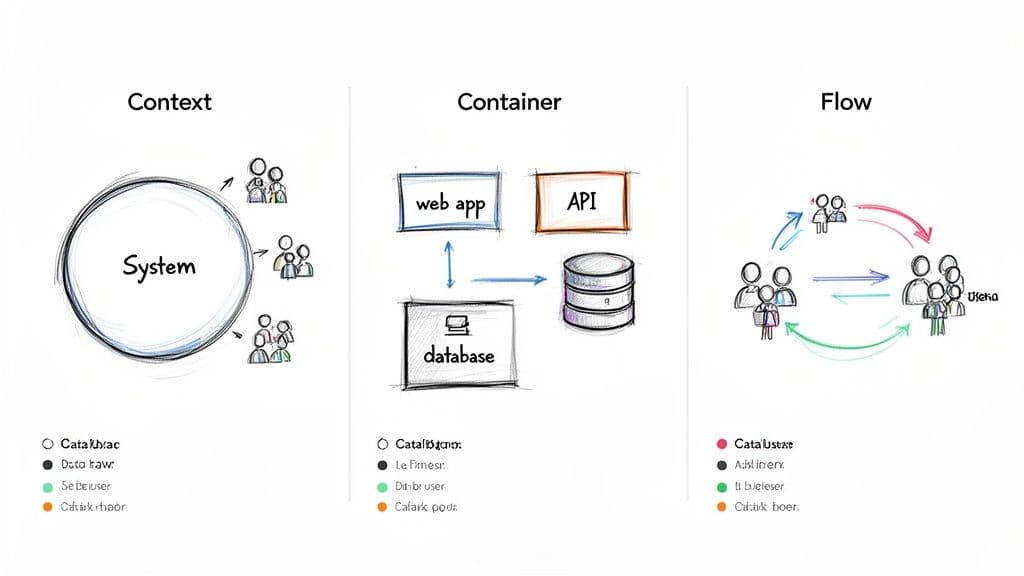
Choose the right diagram for your audience: the most useful diagrams are usually the simplest and tell a single clear story. The C4 model is a practical way to view architecture at different zoom levels2.
The 10,000-Foot View: C4 Context Diagram
The Context diagram is the highest level of abstraction in the C4 model. It shows your system as a single box surrounded by users and external systems it interacts with. This hides internal complexity so stakeholders can understand scope and purpose quickly2.
“A Context diagram is your ultimate elevator pitch. It answers what the system does and who it’s for.”
Zooming In: The C4 Container Diagram
After the Context view, the Container diagram opens the system to show major deployable pieces. A “container” can be a web app, an API service, a database, or a file store. Container diagrams map how these components connect and communicate, giving architects and developers an implementation-adjacent view without code-level noise2.
Illustrating the Journey: Flow Diagrams
Flow diagrams show how things move through the system: user signups, payment processing, or CI pipelines. While Context shows who and Container shows what, Flow diagrams show how a process unfolds across components and reveal bottlenecks.
Create Diagrams That Actually Get Used
Most architectural diagrams end up gathering dust. A useful concept diagram is a living communication tool. Treat diagrams like products: design for your audience and give each diagram a single, clear purpose.
Ask before you start: Who is this for, and what is the one thing they absolutely need to understand? Nail that, and avoid visuals that are either too generic or too dense.
Maintain Clarity and Consistency
Use a consistent visual language: colors, symbols, and line styles should be repeatable across diagrams so people don’t have to relearn conventions. Always include a legend that explains notation such as “solid line = synchronous API call” and “dashed line = asynchronous event.” These small details prevent confusion.
“A diagram’s value is how much understanding it creates. If a detail does not serve the diagram’s purpose for its audience, it is noise—leave it out.”
Treat Diagrams Like Code
Keep diagrams accurate by treating them like source code: version control them, tie updates to pull requests, and review changes. Text-based diagram tools make this practical and reliable34.
Practical steps:
- Use version control: Store diagrams in Git, especially when using "diagrams as code" tools like Mermaid or PlantUML34.
- Integrate into workflows: Require diagram updates in pull request templates when changes affect architecture.
- Centralize and socialize: Publish diagrams where the team naturally looks—wiki pages, docs site, or the repo README. Link architecture pages such as your internal C4 model guide or diagrams-as-code examples so people can find canonical artifacts quickly.
Applying Diagrams in a TypeScript and React Ecosystem
Turn abstract guidance into practical artifacts for stacks that many teams use: TypeScript, React, Next.js, and Node.js. Diagrams force you to answer architectural questions before code is written, clarifying integrations and responsibilities.
C4 Context Diagram for a SaaS Application
For a typical SaaS platform, start with a C4 Context diagram to define boundaries. Place the “SaaS Platform” in the center and show users (Project Manager, Team Member) and external services (payment processor, email provider, SSO). This map sets scope for product discussions without implementation detail.
Zooming In with a Container Diagram
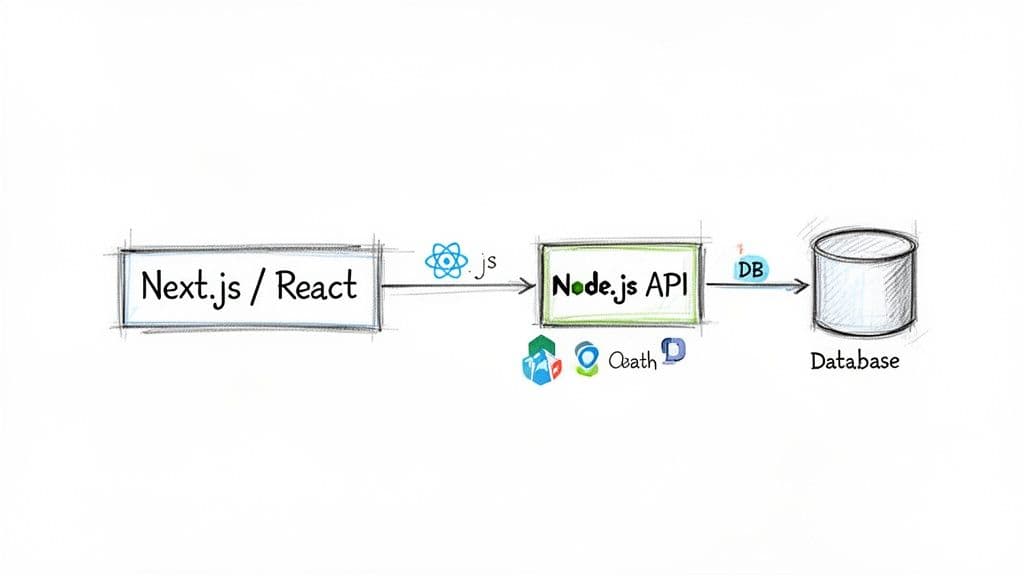
Next, produce a Container diagram that shows major deployable pieces and their interactions. For a modern web app this often includes:
- Next.js web app (React + TypeScript) for the frontend56.
- Node.js API for backend services7.
- PostgreSQL as the primary relational store and Redis for caching or sessions.
The diagram should show HTTPS calls from the frontend to the API, and the API’s connections to the database and cache. This level of clarity helps developers plan features and spot dependencies.
Choosing the Right Tools for Effective Diagramming
The right tool can make diagrams living documents; the wrong tool creates friction. Tools fall into two camps: collaborative whiteboards and diagrams-as-code. Pick based on your team’s culture and workflow.
Collaborative Whiteboards vs. Diagrams as Code
Whiteboarding tools like Miro or Excalidraw are excellent for ideation and workshops where freeform thinking matters89. For long-term, versioned architecture artifacts, diagrams-as-code tools like Mermaid or PlantUML let you keep diagrams in Git and review them with pull requests34.
“The choice often comes down to a trade-off between creative freedom and disciplined consistency. For a diagram to remain a trusted source of truth, it must evolve alongside the system it describes.”
Choose tools that embed into your documentation stack and support the notations you use (C4, sequence flows, etc.). The best tool is the one that gets out of your way and makes updates natural.
Using Diagrams to Guide Refactoring and Code Audits
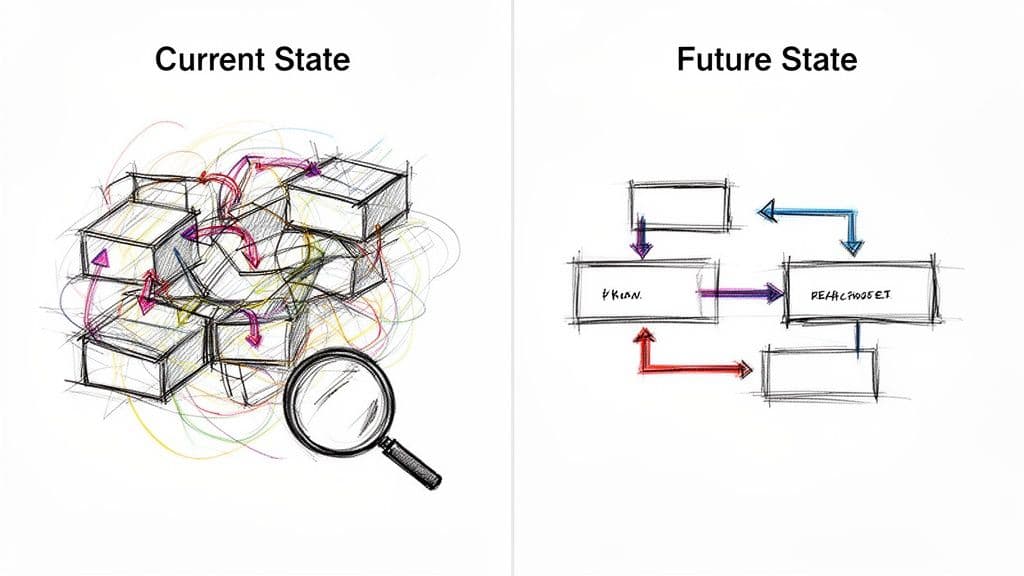
Diagrams are indispensable for taming legacy systems. They’re the backbone of codebase audits and refactoring plans. A simple two-step approach—map current state, design future state—brings clarity and reduces risk.
Mapping the Current State
Create a “current state” diagram that represents the system as it actually is. This discovery reveals hidden dependencies and architectural smells faster than combing through code alone. Use this diagram to justify refactoring work and to prioritize where changes will deliver the most value.
“An accurate current-state diagram replaces guesswork with a shared understanding of problems.”
Charting the Future State
Design a “future state” diagram that shows the target architecture. This map aligns the team, decomposes a large refactor into manageable steps, and gives a clear way to measure progress.
Practical Advice
How Often Should We Update Diagrams?
Treat diagrams as living artifacts. Update them when there is a meaningful architectural change—adding a service, changing a critical integration, or altering data boundaries. Tying updates to pull requests and planning cycles helps keep diagrams accurate.
Biggest Mistake Teams Make
The most common pitfall is overloading diagrams with detail. A concept diagram should clarify, not catalog. Always ask, “Who is this for, and what do they really need to know?” Then remove anything that does not serve that purpose.
How Diagrams Help Onboard New Developers
High-level diagrams accelerate onboarding by giving new hires context immediately. Instead of digging through thousands of lines of code, a new developer can start from a map that shows where their work fits and why it matters—saving time and reducing early mistakes110.
FAQ — Quick Q&A
Q: What is a concept diagram and why does it matter?
A: A concept diagram is a high-level visual map that shows a system’s purpose, boundaries, and major components. It aligns teams and speeds decision-making by making architecture understandable at a glance.
Q: Which diagram type should I start with?
A: Start with a C4 Context diagram to set scope for nontechnical stakeholders, then create a Container diagram for engineering-level clarity2.
Q: How do we keep diagrams up to date?
A: Treat diagrams like code: version-control them, include updates in pull requests, and make diagram reviews part of your architecture or sprint processes. Use diagrams-as-code tools if you need tight sync with your repo3.
Concise Q&A (for busy readers)
Q: How quickly will diagrams improve team alignment?
A: You’ll usually see clearer discussions and fewer misunderstandings within a single planning cycle once a shared diagram is adopted.
Q: What’s the minimum detail a concept diagram needs?
A: It needs system purpose, primary users or actors, major components, and one or two key integrations—nothing else.
Q: Which tool should I pick first?
A: Use a whiteboard for discovery, then persist the canonical diagram in a diagrams-as-code tool stored in Git for traceability.
1.
Glassdoor, “Onboarding New Hires,” Glassdoor for Employers, https://www.glassdoor.com/employers/blog/onboarding-new-hires/
2.
C4 Model, “The C4 model for visualising software architecture,” https://c4model.com/
3.
Mermaid, “Mermaid Documentation,” https://mermaid.js.org/
4.
PlantUML, “PlantUML Documentation,” https://plantuml.com/
5.
Next.js, “Next.js Documentation,” https://nextjs.org/
6.
React, “React – A JavaScript library for building user interfaces,” https://react.dev/
7.
Node.js, “Node.js Documentation,” https://nodejs.org/
8.
Miro, “Miro — Online whiteboard for visual collaboration,” https://miro.com/
9.
Excalidraw, “Excalidraw,” https://excalidraw.com/
10.
Deloitte, “Onboarding new employees: A guide to successful onboarding,” https://www2.deloitte.com/us/en/pages/human-capital/articles/onboarding-new-employees.html
11.
State of DevOps / DORA findings, “State of DevOps,” https://cloud.google.com/devops/state-of-devops
🙋🏻♂️
AI writes code.You make it last.
In the age of AI acceleration, clean code isn’t just good practice — it’s the difference between systems that scale and codebases that collapse under their own weight.